Live now — works with the Microsoft 365 your company already has

All of Microsoft 365,
on one calm screen.

Microsoft spreads your company’s people, mailboxes, laptops and security across more than a dozen separate control panels. Unify365 brings them into one place — where you can see everything, ask questions in plain English, and approve every change before it happens.

Look-only until you say otherwise — nothing ever changes without a person clicking yes.
unify365 — ask anything · example company
You ask
Who's paying for a license nobody is using?
checked live, just now · whole company · source shown for every fact
Sarah M. — Financelast opened anything: 94 days ago
David K. — Sales112 days ago
Meeting-room accountnever — full license attached
3 licenses doing nothing ≈ $1,373 / yearPreview the fix →
Nothing happens yet — you’ll see the exact change first, and you can undo for 30 days.
scroll
the problem, solved

“Where did Microsoft put that setting?”

People and passwords live in one portal. Email rules in another. Laptops and phones in a third. Every task means a scavenger hunt — and things slip through the cracks. Unify365 connects to all of them and gives you one searchable home.

Before — the scavenger hunt

19 tabs open, and you still can’t find it

After — one calm screen

Everything, live, in one place
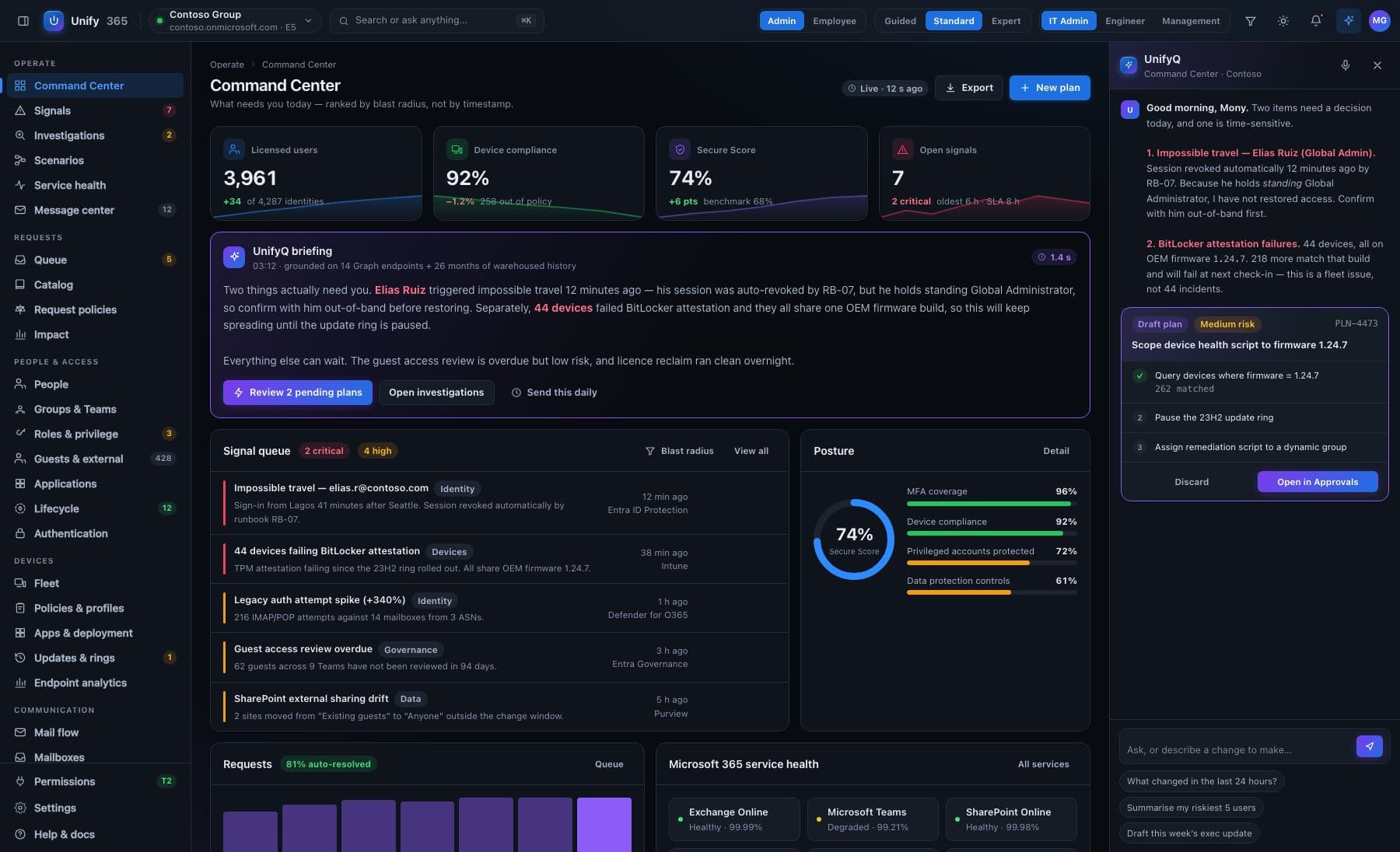
The Unify365 Command Center — your whole company at a glance
The Command Center, from the product design — live posture, and every number drills down.
see the design

Every change, with its receipt.

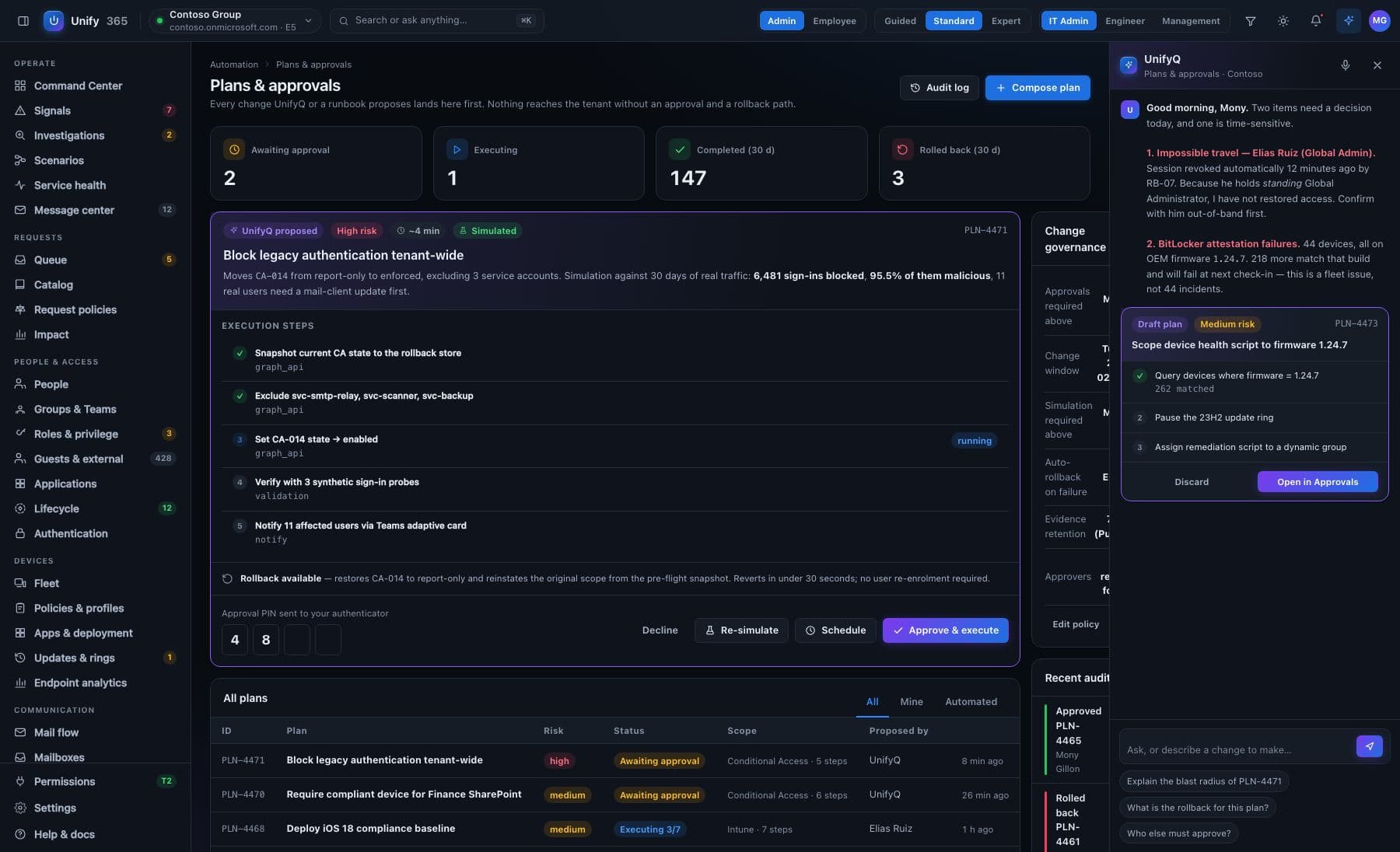
These renders are from the product design — the screens Unify365 is built to. Below: a change waiting at the approval gate, with its steps, its simulation, and its rollback path spelled out before anyone says yes.

Unify365 Plans & approvals — a proposed change with execution steps, simulation results, rollback path, and a typed approval
Plans & approvals — nothing reaches your company without a yes and a rollback pathfrom the product design
made for real days

What do you need to handle today?

Pick the situation — Unify365 walks you through it. Tap a card for the short version, or open the full story.

  • Account off, signed out everywhere, licenses back, group memberships removed — one checklist, each step approved by you. The mailbox and file hand-over are listed on the certificate as follow-ups for a person
  • Ask first, and see what breaks: “is this person the only one holding the finance files?” — before you press go
  • Finish with a signed certificate for your auditor or insurer — it honestly lists anything that still needs a human
Half-finished offboarding is the #1 audit finding in IT. This ends it.
Read the full story
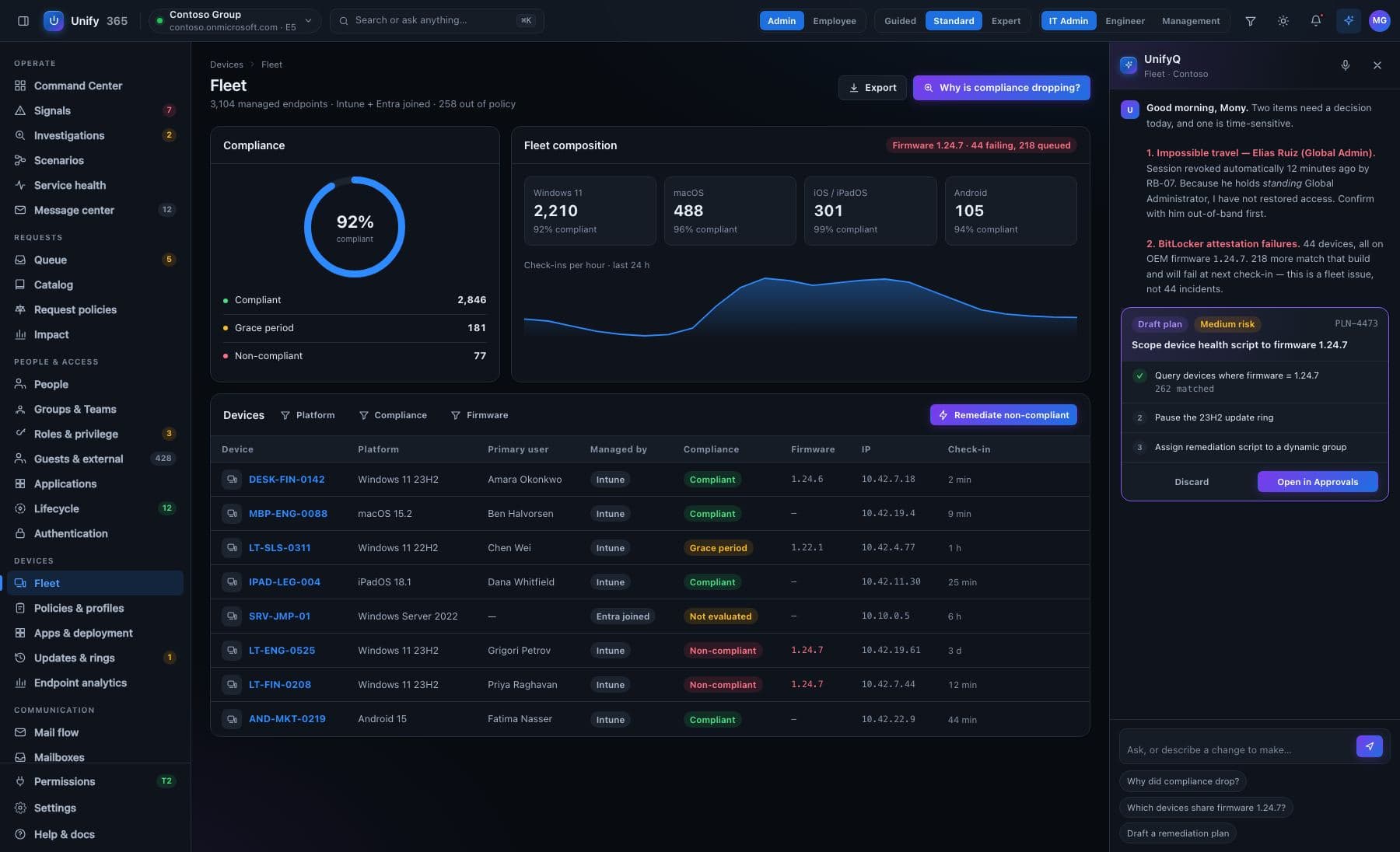
  • Their account, recent sign-ins, laptop health, phone, licenses and mailbox — together on one page, instead of five portals
  • Every fact says how fresh it is (“checked 4 minutes ago”) — you're never guessing from stale info
  • If something can't be read, it says so plainly — a gap is shown as a gap, never papered over
“I can't get email on my phone” stops being an afternoon.
Read the full story
  • See everyone's real access — even when it's inherited through groups inside groups that Microsoft's own screens won't untangle
  • Run a formal review where managers confirm their team's access — and anything left unanswered is recorded as unanswered, never quietly counted as approved
  • Export a time-stamped evidence pack your auditor can actually use
The yearly spreadsheet ritual, retired.
Read the full story
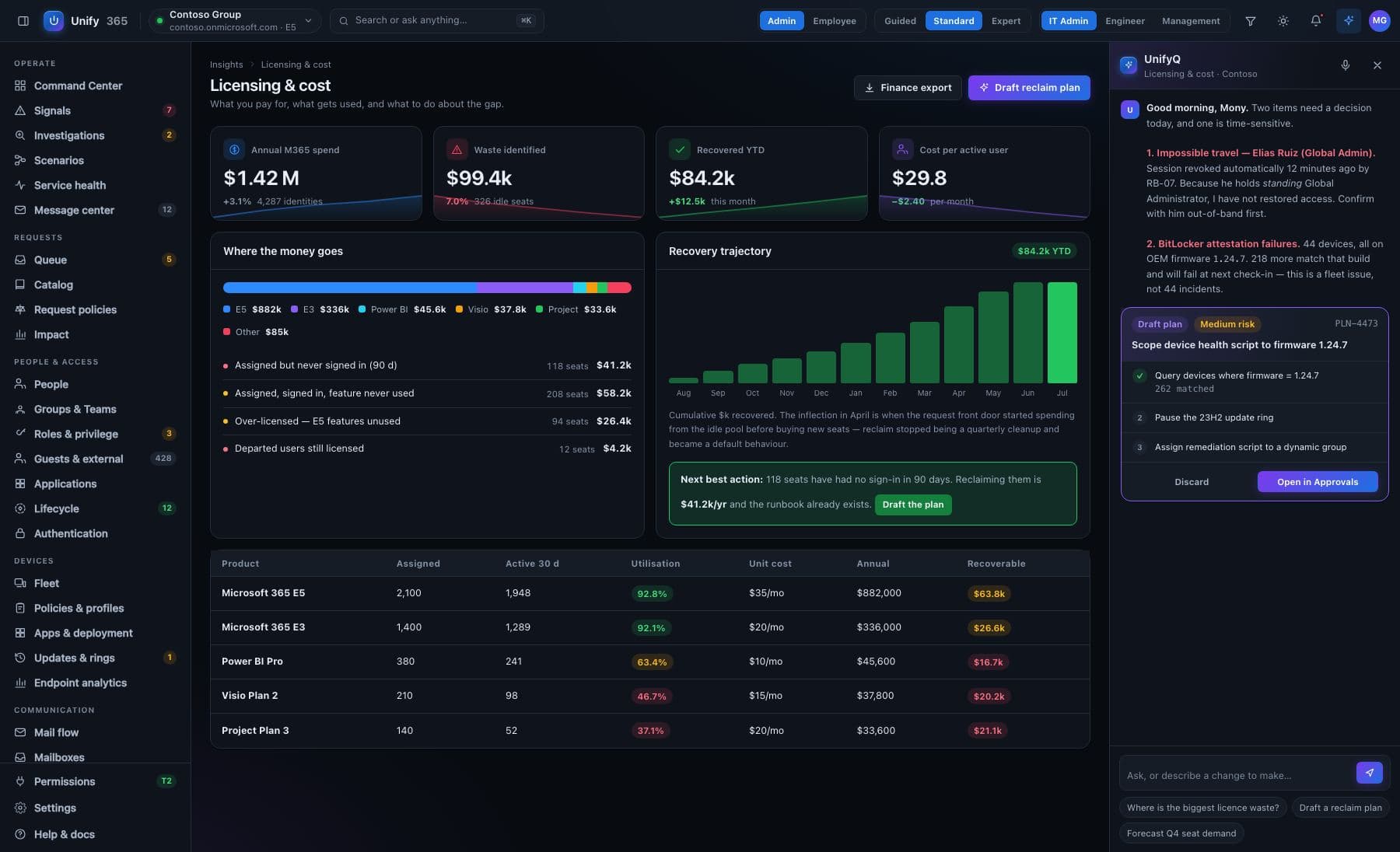
  • Spot paid seats sitting idle, people holding two overlapping licenses, and accounts that were disabled but still billed
  • Goes beyond Microsoft: see seats in other work apps nobody's touched — and apps people signed into that you never approved
  • When we can't tell, we say “unknown” — never “unused.” A wrong savings number is worse than none
Most companies find real money in the first week.
Read the full story
  • Settings that quietly changed, risky sign-ins, doors left open — each alert explains what happened and why it matters, not just a red dot
  • Every alert arrives with a prepared fix — which still waits for your yes
  • About to remove a group or shut off an account? See who loses what first — including the ripple effects nobody remembers
Checked continuously. When a check can't run, it says so — nothing is quietly assumed fine.
Read the full story
  • Every client, one view — sorted by who actually needs attention today, with one search across the whole fleet
  • Step into a client with one click — you get exactly the access they granted, never more, and both sides keep a record of the visit
  • A banner always names whose company you're working in — so the right change lands in the right place
Built multi-company from day one — not bolted on.
Read the full story
the safety promise

Nothing changes without a yes.

Unify365 can fix things for you — hundreds of different changes. But every single one, big or small, walks through the same five doors. No exceptions, no surprises, no 4:55pm accidents.

1

See it first

The exact before-and-after, spelled out — on the real, current data.

2

Type to confirm

You type the name of what's changing. No accidental clicks, ever.

3

Second opinion

A different admin must approve what you proposed. Routines can require two sign-offs.

4

On the record

Who asked, who approved, what changed, when — written down, permanently.

5

Undo button

Most changes can be rolled back for 30 days. It tells you honestly when one can't.

And some doors stay locked no matter what: Unify365 will flat-out refuse to remove your last administrator or lock you out of your own company — even if you ask it to. No change it offers will disable, sign out or strip access from someone holding Global Administrator; no change may leave your company with fewer than two administrators; and no sign-in rule takes effect with every administrator shut out.
no black box

Every dial and switch, mapped — honestly.

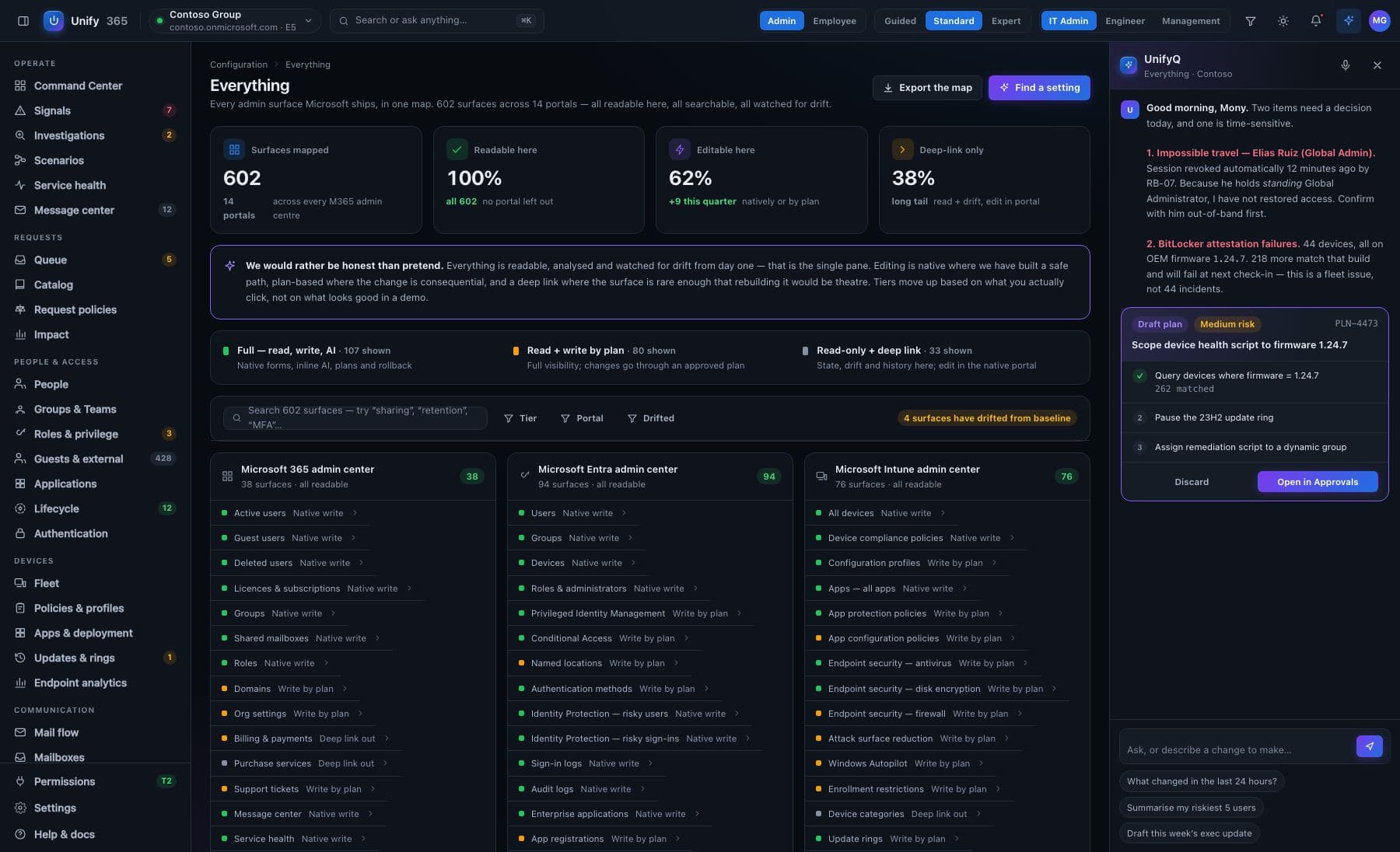
Microsoft 365 has hundreds of screens’ worth of settings. We mapped them all, and we show you plainly what Unify365 can do with each one today — including the ones Microsoft doesn’t offer a connection for yet. Try it — this is our real map, live below.

1066
settings screens mapped
529
already answering live
389
changes it can make — with your yes
19
Microsoft portals, one search
50% answer live today
36% changeable — with your yes
the rest: mapped & waiting on Microsoft
1066 of 1066 shown · 529 answer live · 389 changeable with your yes
Active usersMain admin centeranswers liveGuest usersMain admin centeranswers liveDeleted usersMain admin centeranswers liveLicenses & subscriptionsMain admin centerlive + changeableGroupsMain admin centerlive + changeableShared mailboxesMain admin centerwaiting on MicrosoftRolesMain admin centerlive + changeableDomainsMain admin centerlive + changeableOrg settingsMain admin centerlive + changeableBilling & paymentsMain admin centerwaiting on MicrosoftPurchase servicesMain admin centerwaiting on MicrosoftSupport ticketsMain admin centerwaiting on MicrosoftMessage centerMain admin centerlive + changeableService healthMain admin centeranswers liveUsage reportsMain admin centerlive + changeableAdoption ScoreMain admin centerwaiting on MicrosoftCustomisation (themes)Main admin centerlive + changeablePartner relationshipsMain admin centerlive + changeableUsersAccounts & sign-inlive + changeableGroupsAccounts & sign-inlive + changeableDevicesAccounts & sign-inlive + changeableRoles & administratorsAccounts & sign-inlive + changeablePrivileged Identity ManagementAccounts & sign-inlive + changeableConditional AccessAccounts & sign-inlive + changeableNamed locationsAccounts & sign-inlive + changeableAuthentication methodsAccounts & sign-inlive + changeableIdentity Protection — risky usersAccounts & sign-inlive + changeableIdentity Protection — risky sign-insAccounts & sign-inanswers liveSign-in logsAccounts & sign-inanswers liveAudit logsAccounts & sign-inanswers liveEnterprise applicationsAccounts & sign-inlive + changeableApp registrationsAccounts & sign-inlive + changeableApplication proxyAccounts & sign-inlive + changeableEntitlement managementAccounts & sign-inlive + changeableAccess reviewsAccounts & sign-inlive + changeableLifecycle workflowsAccounts & sign-inlive + changeableExternal identitiesAccounts & sign-inlive + changeableCross-tenant accessAccounts & sign-inanswers liveCustom security attributesAccounts & sign-inlive + changeablePassword resetAccounts & sign-inwaiting on MicrosoftCompany brandingAccounts & sign-inlive + changeableProvisioningAccounts & sign-inanswers liveTenant propertiesAccounts & sign-inlive + changeableDiagnostic settingsAccounts & sign-inwaiting on MicrosoftAll devicesDeviceslive + changeableDevice compliance policiesDeviceslive + changeableConfiguration profilesDeviceslive + changeableApps — all appsDeviceslive + changeableApp protection policiesDeviceslive + changeableApp configuration policiesDeviceslive + changeableEndpoint security — antivirusDeviceslive + changeableEndpoint security — disk encryptionDeviceslive + changeableEndpoint security — firewallDeviceslive + changeableAttack surface reductionDeviceslive + changeableWindows AutopilotDevicesanswers liveEnrollment restrictionsDeviceslive + changeableDevice categoriesDeviceslive + changeableUpdate ringsDeviceslive + changeableFeature updatesDeviceslive + changeableDriver updatesDeviceslive + changeableScripts & remediationsDevicesanswers liveEndpoint analyticsDevicesanswers liveDevice health scriptsDevicesanswers liveTenant attachDeviceslive + changeableTerms and conditionsDeviceslive + changeableFiltersDeviceslive + changeableGroup Policy analyticsDeviceslive + changeableSecurity baselinesDeviceslive + changeableMailboxesEmailchangeableShared mailboxesEmailchangeableResource mailboxesEmaillive + changeableMail flow — rulesEmailwaiting on MicrosoftMail flow — connectorsEmailwaiting on MicrosoftAccepted domainsEmailwaiting on MicrosoftRemote domainsEmailwaiting on MicrosoftMessage traceEmailwaiting on MicrosoftQuarantineSecuritywaiting on MicrosoftAnti-spam policiesSecuritywaiting on MicrosoftAnti-malware policiesSecuritywaiting on MicrosoftAnti-phishing policiesSecuritywaiting on MicrosoftSafe attachmentsSecuritywaiting on MicrosoftSafe linksSecuritywaiting on MicrosoftOutbound spamSecuritywaiting on MicrosoftMobile device accessEmailwaiting on MicrosoftMailbox delegationEmailwaiting on MicrosoftRetention tagsEmailwaiting on MicrosoftAddress book policiesEmailwaiting on MicrosoftOffline address bookEmailwaiting on MicrosoftOrganization configEmailwaiting on MicrosoftMail flow reportsEmailwaiting on MicrosoftActive sitesFiles & siteslive + changeableDeleted sitesFiles & siteswaiting on MicrosoftSharing settingsFiles & siteslive + changeableAccess controlFiles & siteslive + changeableOneDrive settingsFiles & siteslive + changeableStorage limitsFiles & siteswaiting on MicrosoftSite creation settingsFiles & siteslive + changeableTerm storeFiles & siteslive + changeableContent typesFiles & sitesanswers liveMigrationFiles & siteswaiting on MicrosoftAPI accessFiles & siteswaiting on MicrosoftHome siteFiles & siteswaiting on MicrosoftOrganization newsFiles & siteswaiting on MicrosoftSync settingsFiles & siteswaiting on MicrosoftIdle session sign-outFiles & siteswaiting on MicrosoftManage teamsTeamslive + changeableTeams policiesTeamswaiting on MicrosoftMeeting policiesTeamswaiting on MicrosoftMeeting settingsTeamswaiting on MicrosoftLive events policiesTeamswaiting on Microsoft
956 more — keep typing to narrow it down
These numbers are computed from the live map itself — not typed by our marketing team. Where something says “waiting on Microsoft,” that’s the honest state: Microsoft doesn’t offer a connection for it yet, and we’d rather tell you than pretend.
built to be trusted

Careful by design.

Starts look-only

When you connect, Unify365 can only read. The ability to change anything is a separate permission you grant later — if and when you’re ready, one area at a time.

Everything on the record

Every question asked and every change made is written down — who, what, when, and what it looked like before. Your records, exportable anytime, ready for any audit.

The 30-day undo

Changed your mind? Most changes roll back with one click for 30 days. And when something genuinely can’t be undone, Unify365 says so before you approve it — not after.

It even watches itself. Unify365’s own monitoring flagged a risky admin setup in our company — and separately spotted two forgotten app accounts still holding live keys. It found both on its own, told us plainly, and confirmed when we fixed them. That’s the product we’re selling you.

simple pricing

Start free. Pay only for the people you manage.

No sales call required. Guests and equipment accounts are never billed. Upgrade unlocks instantly; downgrade never breaks anything — features simply switch off.

What’s included:
  • The whole console, read-only — people, devices, licenses, mail, security, spending
  • Ask UnifyQ anything in plain English — 50 answers a month
  • Every number opens into the real list behind it
  • One company, up to 25 people (guests never count)
  • Activity records kept 7 days
  • Community support
Everything in Free, plus:
  • Make changes, not just look — every change shows its plan first, needs a typed yes, and can be undone for 30 days
  • No limit on people
  • UnifyQ: 500 answers a month
  • Change records kept 90 days
  • Email support
MOST POPULAR
Everything in Team, plus:
  • Routines that run themselves — you set how much they do alone, from “just tell me” to “two people must sign off”
  • Quiet-change watch — if a setting drifts from how you set it, you’ll know, and can put it back
  • Scheduled check-ups, with alerts where you work — email, a webhook, or your own monitoring system
  • Settings time travel — see how anything was set on any past day
  • “What breaks first” previews before risky sign-in changes
  • House rules, checked continuously — exceptions need a written reason
  • Helpers see only what you hand them — scoped admin
  • Reports that send themselves — any report, any format, on a schedule
  • Sign in with your company login (single sign-on)
  • UnifyQ: 2,500 answers a month on the most capable model
  • Records kept 400 days · priority support
Everything in Business, plus:
  • Seven-year change records
  • UnifyQ without limits — and under your own keys, in a cloud account you control
  • Every event streamed live to your security monitoring system
  • Run more than one company from one console, under your own brand
  • A named contact who knows your setup
  • A written service guarantee (SLA)
Everything in Business, for every client — plus:
  • All your clients in one console — search across every company at once
  • The fleet view — clients ranked by what needs attention first
  • Clients are walled off from each other; switching is deliberate, never accidental
  • Your brand on the console and the reports you send
  • UnifyQ: 500 answers a month for every client, in one shared pool — 10 clients means 5,000
  • $1.50 /person /mo on top · 10% off at 10 clients, 20% at 25, 30% at 50

Buy direct today — Microsoft’s app marketplace listing is in progress.

Ask. Approve. Done.

Connect your Microsoft 365 in minutes with one approval.
Look-only until you decide otherwise.