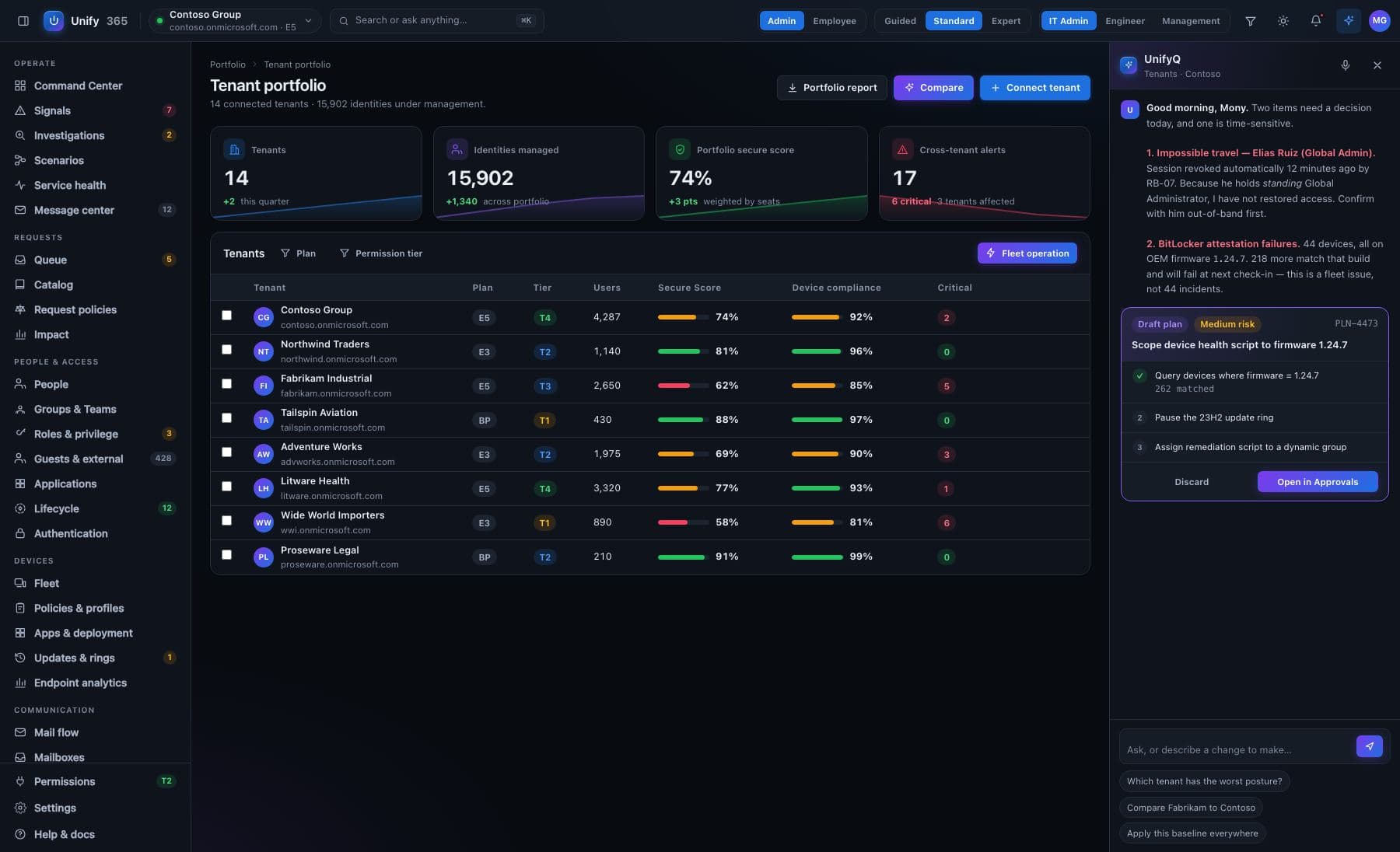
All your clients. One screen. Zero “which tab was that again?”
If you run IT for many companies, your day is forty browser profiles and a prayer. Unify365 was built multi-company from the first line: one portfolio view sorted by who needs you, and a one-click switch that can never give you more access than a client granted.
Four steps, start to proof.
The morning view
Every client on one screen: open findings, devices out of shape, licenses leaking, changes waiting for approval — weighted so the client who needs you most is at the top. One search runs across the whole fleet.
Step in with one click
No second login, no password vault gymnastics. Switching grants entry with exactly the role that client gave you — a banner names whose company you're in, and both sides keep a record of the visit.
Work with their rules
Inside a client, their approval rules apply. Your helpdesk proposes; their named approver (or yours, if they delegated it) says yes. Every change lands in that client's own permanent record.
Step back out
Return home and your own access is restored exactly as it was. The switch can never widen a role, never outlive your session, and never leave a client without a record that you were there.
Every change here walks through the five doors.
See it first
The exact before-and-after, spelled out — on the real, current data.
Type to confirm
You type the name of what's changing. No accidental clicks, ever.
Second opinion
A different admin must approve what you proposed. Routines can require two sign-offs.
On the record
Who asked, who approved, what changed, when — written down, permanently.
Undo button
Most changes can be rolled back for 30 days. It tells you honestly when one can't.
Built honest, on purpose.
Entry-only, provably
The switch grants entry — never elevation. If a client made you a viewer, you're a viewer. This isn't a policy promise; it's how the mechanism is built, and it held in live testing.
Attention-sorted, honestly
The portfolio ranks clients by real signals — findings, drift, waiting approvals — and when a number can't be computed for a client, it's shown as not-computed, never as a comforting zero.
No client list to steal
Access is granted per person, per client. There is no master directory a compromised account can enumerate — by design.
What it won't pretend: Unify365 covers the Microsoft 365 side of your clients today, with on-premises systems on the way (early access). It complements your existing remote-management tooling; it doesn't claim to replace it.
How does per-client billing work?
Can clients see what we did?
Ask. Approve. Done.
Unify365 is in development. Join the waitlist and you’ll hear from us first when it’s ready for your company.
Look-only until you decide otherwise.