← home
Every dial and switch, mapped — honestly.
Microsoft 365 has hundreds of screens’ worth of settings, spread across more than a dozen consoles. We mapped them all. This page is our real map — the same one the product runs on — with the honest state of every entry. Search anything.
1090
settings screens mapped
817
already answering live
553
changes it can make — with your yes
20
Microsoft portals, one search
75% answer live today
51% changeable — with your yes
the rest: mapped — 183 with no Microsoft way in, 80 not built yet
1090 of 1090 shown · 817 answer live · 553 changeable with your yes
Active usersMain admin centerlive + changeableGuest usersMain admin centerlive + changeableDeleted usersMain admin centerlive + changeableLicenses & subscriptionsMain admin centerlive + changeableGroupsMain admin centerlive + changeableShared mailboxesMain admin centerlive + changeableRolesMain admin centerlive + changeableDomainsMain admin centerlive + changeableOrg settingsMain admin centerlive + changeableBilling & paymentsMain admin centerno Microsoft way inPurchase servicesMain admin centerno Microsoft way inSupport ticketsMain admin centerno Microsoft way inMessage centerMain admin centerlive + changeableService healthMain admin centeranswers liveUsage reportsMain admin centerlive + changeableAdoption ScoreMain admin centerno Microsoft way inCustomization (themes)Main admin centerlive + changeablePartner relationshipsMain admin centerlive + changeableUsersAccounts & sign-inlive + changeableGroupsAccounts & sign-inlive + changeableDevicesAccounts & sign-inlive + changeableRoles & administratorsAccounts & sign-inlive + changeablePrivileged Identity ManagementAccounts & sign-inlive + changeableConditional AccessAccounts & sign-inlive + changeableNamed locationsAccounts & sign-inlive + changeableAuthentication methodsAccounts & sign-inlive + changeableIdentity Protection — risky usersAccounts & sign-inlive + changeableIdentity Protection — risky sign-insAccounts & sign-inanswers liveSign-in logsAccounts & sign-inanswers liveAudit logsAccounts & sign-inanswers liveEnterprise applicationsAccounts & sign-inlive + changeableApp registrationsAccounts & sign-inlive + changeableApplication proxyAccounts & sign-inlive + changeableEntitlement managementAccounts & sign-inlive + changeableAccess reviewsAccounts & sign-inlive + changeableLifecycle workflowsAccounts & sign-inlive + changeableExternal identitiesAccounts & sign-inlive + changeableCross-tenant accessAccounts & sign-inlive + changeableCustom security attributesAccounts & sign-inlive + changeablePassword resetAccounts & sign-inlive + changeableCompany brandingAccounts & sign-inlive + changeableProvisioningAccounts & sign-inanswers liveTenant propertiesAccounts & sign-inlive + changeableDiagnostic settingsAccounts & sign-inmapped, not built yetAll devicesDeviceslive + changeableDevice compliance policiesDeviceslive + changeableConfiguration profilesDeviceslive + changeableApps — all appsDeviceslive + changeableApp protection policiesDeviceslive + changeableApp configuration policiesDeviceslive + changeableEndpoint security — antivirusDeviceslive + changeableEndpoint security — disk encryptionDeviceslive + changeableEndpoint security — firewallDeviceslive + changeableAttack surface reductionDeviceslive + changeableWindows AutopilotDeviceslive + changeableEnrollment restrictionsDeviceslive + changeableDevice categoriesDeviceslive + changeableUpdate ringsDeviceslive + changeableFeature updatesDeviceslive + changeableDriver updatesDeviceslive + changeableScripts & remediationsDeviceslive + changeableEndpoint analyticsDevicesanswers liveDevice health scriptsDeviceslive + changeableTenant attachDeviceslive + changeableTerms and conditionsDeviceslive + changeableFiltersDeviceslive + changeableGroup Policy analyticsDeviceslive + changeableSecurity baselinesDeviceslive + changeableMailboxesEmaillive + changeableShared mailboxesEmaillive + changeableResource mailboxesEmaillive + changeableMail flow — rulesEmaillive + changeableMail flow — connectorsEmailanswers liveAccepted domainsEmaillive + changeableRemote domainsEmaillive + changeableMessage traceEmailmapped, not built yetQuarantineSecuritylive + changeableAnti-spam policiesSecuritylive + changeableAnti-malware policiesSecuritylive + changeableAnti-phishing policiesSecuritymapped, not built yetSafe attachmentsSecuritymapped, not built yetSafe linksSecuritymapped, not built yetOutbound spamSecuritymapped, not built yetMobile device accessEmaillive + changeableMailbox delegationEmaillive + changeableRetention tagsEmailanswers liveAddress book policiesEmaillive + changeableOffline address bookEmaillive + changeableOrganization configEmaillive + changeableMail flow reportsEmailanswers liveActive sitesFiles & siteslive + changeableDeleted sitesFiles & siteslive + changeableSharing settingsFiles & siteslive + changeableAccess controlFiles & siteslive + changeableOneDrive settingsFiles & siteslive + changeableStorage limitsFiles & siteslive + changeableSite creation settingsFiles & siteslive + changeableTerm storeFiles & siteslive + changeableContent typesFiles & sitesanswers liveMigrationFiles & sitesmapped, not built yetAPI accessFiles & siteslive + changeableHome siteFiles & siteslive + changeableOrganization newsFiles & siteslive + changeableSync settingsFiles & siteslive + changeableIdle session sign-outFiles & siteslive + changeableManage teamsTeamslive + changeableTeams policiesTeamslive + changeableMeeting policiesTeamslive + changeableMeeting settingsTeamslive + changeableLive events policiesTeamslive + changeable
…980 more — keep typing to narrow it down
These numbers are computed from the live map itself — not typed by our marketing team. Of the screens we have not wired, 183 say “no Microsoft way in”: Microsoft publishes no connection to them at all, so their own console is the only way in and we say so rather than pretend. The other 80 say “mapped, not built yet” — Microsoft does offer a way in and we haven’t built it. That is our backlog, and we would rather name it than blame Microsoft for it.
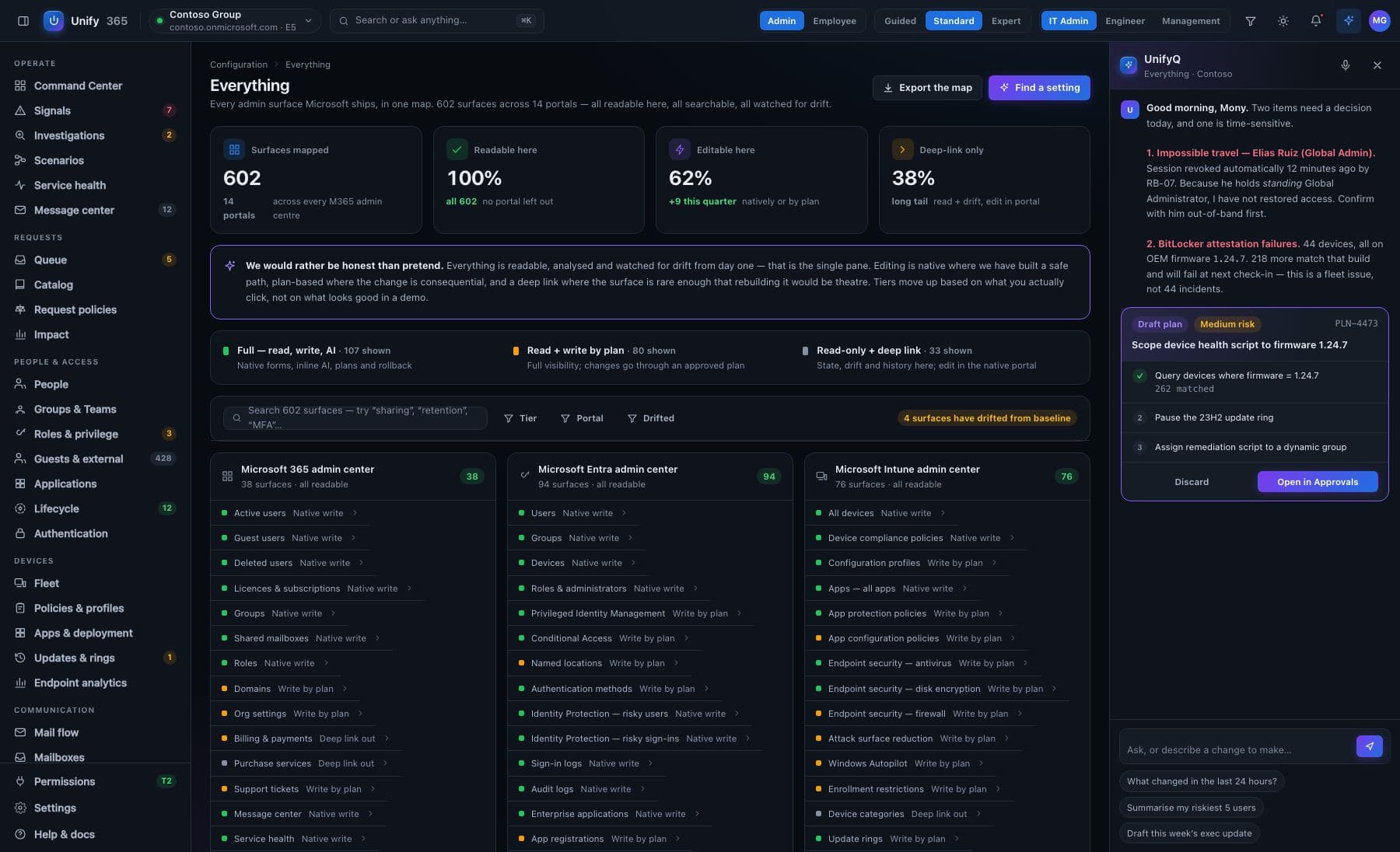
The same map, as designed — one search over every screenfrom the product design
How do you count these?
Every entry on this map is a real screen’s worth of settings in a Microsoft admin console. “Answers live” means the map declares a read path for it — the call the product makes when you open that screen signed in. That call is Microsoft Graph for 544 of the 817, and for the rest it is a Microsoft PowerShell command run by our own connector inside your network, or a Microsoft interface that is not Graph. All three are real reads of your own company’s data, which is why they are counted together. It is not a promise that every company has granted the permission it needs: when a read is refused for your company, the screen says so instead of showing an empty list. “Changeable” means a change can be prepared and run through the approval gate. The totals on this page are computed from the map itself as it is rendered; nobody types them.
What do the two grey states mean?
They are different admissions, and we stopped printing one over both. “No Microsoft way in” (183 screens) means Microsoft publishes no connection to that page at all — their own console is the only way to see or change it, and nothing we build will change that. “Mapped, not built yet” (80 screens) means Microsoft does publish a way in and we have not built it. That one is on us, and saying so is the point: blaming Microsoft for our own backlog would be the easy version. We list both anyway, because a map with the hard parts erased isn’t a map, and as each one is built its state changes here automatically.
Why should I trust this page?
Because it shows its work: the states come from the same registry the product runs on, the counts are computed from the rows you’re scrolling, and the things we can’t do are printed in the same font size as the things we can.
See your own company on this map.
Unify365 is in development. Join the waitlist and you’ll hear from us first when it’s ready for your company.
Look-only until you decide otherwise.